
Бортовой журнал
Полет нормальный. Без происшествий.
Ошибки PHP: как выявить и что с ними делать?
Если у вас сайт на PHP, даже самый простой, время от времени в его скриптах могут возникать ошибки. Это может привести к различным неприятным последствиям, от некорректной работы некоторых компонентов сайта (например, формы обратной связи), до недоступности сайта целиком. Как самостоятельно распознать тип ошибки PHP и понять, что с ней делать дальше?
Этот материал поможет вам, во-первых, самостоятельно оценить ситуацию (и, возможно, даже решить ее), а во-вторых, точно ускорит диагностику и решение проблемы при обращении в службу поддержки. Самые ценные советы по устранению наиболее частых ошибок PHP, связанных с лимитами оперативной памяти, вы найдете в конце статьи.
Как обнаружить ошибку PHP на сайте
1. Встроенными средствами браузера
Итак, если на сайте вместо привычной страницы ничего не отображается (вы видите “пустую страницу”), то, вероятнее всего, в одном из скриптов возникла ошибка. В этом можно убедиться, воспользовавшись встроенными «Инструментами разработчика» вашего браузера. В каждом браузере они могут называться немного по-разному, но суть от этого не меняется.
Например, в браузере Google Chrome это вкладка Dev Tools (или «Инструменты разработчика»). В Mozilla Firefox — это расширение Firebug (его нужно установить отдельно в меню Adds On) или же вкладка Developer.
Внутри «Инструментов разработчика» нас интересует вкладка, которая называется Network (или Net, или каким-то похожим образом).
Если на странице сайта присутствует ошибка, в этой вкладке вы увидите код ответа 500 (“Internal Server Error”).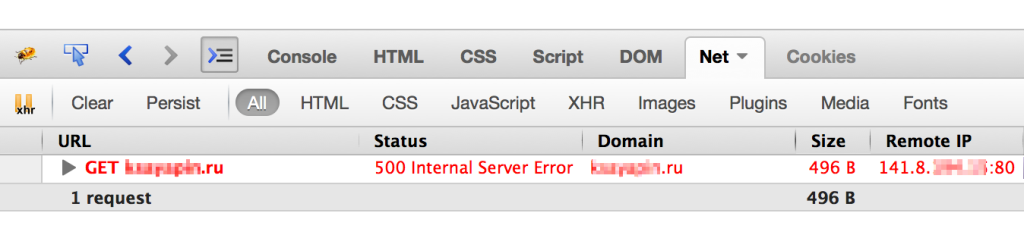
2. Если вывод сообщений об ошибках в браузер отключен
Если сайтом используется, например, CMS WordPress, то отображение ошибок можно также включить, заменив в файле wp-config.php:
3. С помощью журнала ошибок PHP
php_value error_log /home/login/domains/domain.ru/log/errors.log
Здесь /home/login/domains/domain.ru/log/errors.log — это полный путь до файла, в который будут записываться ошибки PHP (если файла с таким именем нет, он будет создан автоматически при появлении ошибки).
Теперь, если мы снова зайдем на сайт с ошибкой (либо обновим страницу с ошибкой), то в errors.log будут записаны сообщения об ошибках.
Журнал ошибок PHP можно просмотреть, например, с помощью файлового менеджера в Панели управления, открыв файл errors.log:

Также можно открыть файл с ошибками и нажать кнопку “Включить автообновление”. Таким образом, новые записи в журнале можно просматривать в реальном времени.
Расшифровка ошибок PHP
Как правило, в сообщении об ошибке достаточно подробно указано где именно и при выполнении какой части кода она возникла. Например:
 Здесь ошибка заключается в следующем:
Fatal error: Call to undefined function weblizar_get_options() in /home/login/domains/domain.ru/public_html/wp-content/themes/enigma/header.php on line 14
“Вызов неопределенной функции weblizar_get_options() в файле используемой на сайте темы enigma”.
Что делать, в зависимости от типа ошибки PHP
Условно ошибки PHP можно разбить на 4 уровня:
Parse Error
Возникают, если уже на этапе проверки кода интерпретатором PHP найдена ошибка. Чаще всего это синтаксические ошибка (например, пропущенная точка с запятой). Скорее всего, такая ошибка возникла в результате последних внесенных на сайт изменений.
Что делать?
1. Если вы НЕ специалист в PHP, восстановите сайт из последней резервной копии на тот момент, когда сайт работал без ошибок.
2. Если вы специалист и самостоятельно вносили правки в код сайта, вы наверняка сможете отследить синтаксическую ошибку и исправить ее. Но проще все же воспользоваться пунктом 1.
Fatal Error и Warning
Возникают, если при выполнении кода какой-то его участок не может быть выполнен (например, попытка открыть несуществующий файл). Разница между 2-ым и 3-им уровнем в том, что при получении “критической ошибки” (FATAL ERROR) выполнение скрипта завершится, а при получении “предупреждения” (WARNING) — нет.
Что делать?
Восстановите сайт из последней доступной резервной копии на тот момент, когда он работал без ошибок.
Notice
К этому уровню ошибок относятся различные “замечания”, суть которых обычно отображена в тексте ошибки.
Что делать?
Если замечание самостоятельно исправить не получается, обратитесь в службу поддержки или же восстановите сайт из последней доступной резервной копии на тот момент, когда он работал без ошибок.
Частые ошибки PHP и их решение
Fatal Error: Allowed Memory
Вместо 128M укажите желаемый размер ограничения. Обратите внимание, что символ «M» (латинская M) указывается слитно со значением.
Помните, что есть максимальные значения памяти, отведенной на выполнение скриптов PHP, предусмотенные вашим тарифом хостинга (например, на тарифах виртуального хостинга это 512 Мб, премиум — 1024 Мб). Уточните эти значения у вашего провайдера, если они не указаны явно.
Fatal Error: Out of memory
То же самое, что и предыдущая ошибка, с той разницей, что достигнут лимит памяти, заданный “снаружи”. Обратите внимание на параметр “Памяти на процесс, Мб, не более“ в условиях пользования нашим сервисом.
Для решения вопроса в данном случае, скорее всего, потребуется либо оптимизация скриптов, чтобы они потребляли меньше памяти, либо разбиение процессов на части. Например, объемную загрузку или выгрузку данных, если она упирается в данный лимит, имеет смысл производить частями.
Также в этом случае мы советуем попробовать отключить акселераторы PHP, если они у вас подключены.
Unable to allocate memory for pool
Сайтам на аккаунте не хватает выделенной на тарифном плане памяти для акселераторов PHP.
Для решения проблемы вы можете отключить использование акселераторов в Панели управления хостингом, в разделе «Управление персональным веб-сервером».
php_value apc.cache_by_default off
Обычно имеет смысл оставлять APC для использования на самом посещаемом из ваших сайтов — это позволит использовать именно на нем преимущества акселератора, не заполняя его память данными с других, менее посещаемых сайтов.
В случаях, когда акселератор объективно необходим для корректной и комфортной работы сайтов и его отключение нежелательно, напишите в службу поддержки.
Мы постараемся предложить возможные варианты решения.
A PHP Error was encountered Severity: Notice Message: Only variable references should be returned by reference Filename: core/Common.php Line Number: 257 #300
Comments
jpswade commented Jan 29, 2015
There’s a bug with FuelCMS 1.2.1 on PHP 5.6.
The text was updated successfully, but these errors were encountered:
jpswade commented May 21, 2015
Your fix solves it for me.
gandimadhurya commented Jun 30, 2015
aportac commented Aug 9, 2015
sancoLgates commented Aug 18, 2015
it works, thank you for your help
pradita033 commented Sep 23, 2015
rpalzona commented Nov 2, 2015
it worked. thank you!
julioware commented Feb 3, 2016
blupalmail commented Jul 5, 2016 •
need help
File: /hermes/bosnaweb15a/b2485/ipg.navcosys/buymineralwater/application/views/includes/header_v.php
A PHP Error was encountered
Message: Undefined variable: metakeywords
File: /hermes/bosnaweb15a/b2485/ipg.navcosys/buymineralwater/application/views/includes/header_v.php
Line: 11
Function: _error_handler
File: /hermes/bosnaweb15a/b2485/ipg.navcosys/buymineralwater/application/controllers/Blupal.php
Line: 884
Function: view
File: /hermes/bosnaweb15a/b2485/ipg.navcosys/buymineralwater/index.php
Line: 292
Function: require_once
»/>
A PHP Error was encountered
Message: Undefined variable: metadescription
File: /hermes/bosnaweb15a/b2485/ipg.navcosys/buymineralwater/application/views/includes/header_v.php
Line: 12
Function: _error_handler
File: /hermes/bosnaweb15a/b2485/ipg.navcosys/buymineralwater/application/controllers/Blupal.php
Line: 884
Function: view
File: /hermes/bosnaweb15a/b2485/ipg.navcosys/buymineralwater/index.php
Line: 292
Function: require_once
»/>
A PHP Error was encountered
Message: Undefined variable: ogdescription
File: /hermes/bosnaweb15a/b2485/ipg.navcosys/buymineralwater/application/views/includes/header_v.php
Line: 46
Function: _error_handler
File: /hermes/bosnaweb15a/b2485/ipg.navcosys/buymineralwater/application/controllers/Blupal.php
Line: 884
Function: view
File: /hermes/bosnaweb15a/b2485/ipg.navcosys/buymineralwater/index.php
Line: 292
Function: require_once
«>
A PHP Error was encountered
Message: Undefined variable: ogtitle
File: /hermes/bosnaweb15a/b2485/ipg.navcosys/buymineralwater/application/views/includes/header_v.php
Line: 48
Function: _error_handler
File: /hermes/bosnaweb15a/b2485/ipg.navcosys/buymineralwater/application/controllers/Blupal.php
Line: 884
Function: view
File: /hermes/bosnaweb15a/b2485/ipg.navcosys/buymineralwater/index.php
Line: 292
Function: require_once
«>
A PHP Error was encountered
Message: Undefined variable: ogurl
File: /hermes/bosnaweb15a/b2485/ipg.navcosys/buymineralwater/application/views/includes/header_v.php
Line: 51
Function: _error_handler
File: /hermes/bosnaweb15a/b2485/ipg.navcosys/buymineralwater/application/controllers/Blupal.php
Line: 884
Function: view
File: /hermes/bosnaweb15a/b2485/ipg.navcosys/buymineralwater/index.php
Line: 292
Function: require_once
«>
Go Home
Track Your Complaint
Enter Complaint Number
Book mineral water online
A PHP Error was encountered
Message: Undefined variable: H1
File: /hermes/bosnaweb15a/b2485/ipg.navcosys/buymineralwater/application/views/brandlists.php
Line: 19
Function: _error_handler
File: /hermes/bosnaweb15a/b2485/ipg.navcosys/buymineralwater/application/controllers/Blupal.php
Line: 885
Function: view
File: /hermes/bosnaweb15a/b2485/ipg.navcosys/buymineralwater/index.php
Line: 292
Function: require_once
A B C D E F G H I J K L M N O P Q R S T U V W X Y Z
Click for Pricing & Details
Aqua Fresh
Click for Pricing & Details
TAJA
Click for Pricing & Details
SURYA
LOGIN | HOME | JOIN US | CONTACT US | FAQ | TERMS OF USER | PRIVACY & LEGAL POLICY | BOTTLED WATER COMPLAINT | SITEMAP | BRANDS
COPYRIGHT © BLUPAL. ALL RIGHTS RESERVED. BACK TO TOP
A PHP Error was encountered Severity: 8192 error i got after installing the bonfire #1273
Comments
ilemonajames commented Jun 12, 2017
A PHP Error was encountered
Message: Methods with the same name as their class will not be constructors in a future version of PHP; MarkdownExtraExtended_Parser has a deprecated constructor
File: C:\xampp\htdocs\bonfire\application\third_party\MX\Loader.php
Line: 123
Function: helper
File: C:\xampp\htdocs\bonfire\bonfire\core\BF_Loader.php
Line: 57
Function: helper
File: C:\xampp\htdocs\bonfire\bonfire\libraries\CommonMark\drivers\CommonMark_MarkdownExtended.php
Line: 41
Function: helper
File: C:\xampp\htdocs\bonfire\bonfire\libraries\CommonMark\CommonMarkDriver.php
Line: 98
Function: init
File: C:\xampp\htdocs\bonfire\bonfire\libraries\CommonMark\CommonMarkDriver.php
Line: 79
Function: loadLibrary
File: C:\xampp\htdocs\bonfire\bonfire\libraries\CommonMark.php
Line: 128
Function: convert
File: C:\xampp\htdocs\bonfire\bonfire\modules\docs\controllers\Docs.php
Line: 373
Function: convert
File: C:\xampp\htdocs\bonfire\bonfire\modules\docs\controllers\Docs.php
Line: 111
Function: read_page
File: C:\xampp\htdocs\bonfire\index.php
Line: 314
Function: require_once
A PHP Error was encountered
Message: Methods with the same name as their class will not be constructors in a future version of PHP; Markdown_Parser has a deprecated constructor
File: C:\xampp\htdocs\bonfire\bonfire\helpers\markdown_extended_helper.php
Line: 2
Function: _error_handler
File: C:\xampp\htdocs\bonfire\bonfire\helpers\markdown_extended_helper.php
Line: 2
Function: require_once
File: C:\xampp\htdocs\bonfire\application\third_party\MX\Loader.php
Line: 123
Function: helper
File: C:\xampp\htdocs\bonfire\bonfire\core\BF_Loader.php
Line: 57
Function: helper
File: C:\xampp\htdocs\bonfire\bonfire\libraries\CommonMark\drivers\CommonMark_MarkdownExtended.php
Line: 41
Function: helper
File: C:\xampp\htdocs\bonfire\bonfire\libraries\CommonMark\CommonMarkDriver.php
Line: 98
Function: init
File: C:\xampp\htdocs\bonfire\bonfire\libraries\CommonMark\CommonMarkDriver.php
Line: 79
Function: loadLibrary
File: C:\xampp\htdocs\bonfire\bonfire\libraries\CommonMark.php
Line: 128
Function: convert
File: C:\xampp\htdocs\bonfire\bonfire\modules\docs\controllers\Docs.php
Line: 373
Function: convert
File: C:\xampp\htdocs\bonfire\bonfire\modules\docs\controllers\Docs.php
Line: 111
Function: read_page
File: C:\xampp\htdocs\bonfire\index.php
Line: 314
Function: require_once
A PHP Error was encountered
Message: Methods with the same name as their class will not be constructors in a future version of PHP; MarkdownExtra_Parser has a deprecated constructor
File: C:\xampp\htdocs\bonfire\bonfire\helpers\markdown_extended_helper.php
Line: 2
Function: _error_handler
File: C:\xampp\htdocs\bonfire\bonfire\helpers\markdown_extended_helper.php
Line: 2
Function: require_once
File: C:\xampp\htdocs\bonfire\application\third_party\MX\Loader.php
Line: 123
Function: helper
File: C:\xampp\htdocs\bonfire\bonfire\core\BF_Loader.php
Line: 57
Function: helper
File: C:\xampp\htdocs\bonfire\bonfire\libraries\CommonMark\drivers\CommonMark_MarkdownExtended.php
Line: 41
Function: helper
File: C:\xampp\htdocs\bonfire\bonfire\libraries\CommonMark\CommonMarkDriver.php
Line: 98
Function: init
File: C:\xampp\htdocs\bonfire\bonfire\libraries\CommonMark\CommonMarkDriver.php
Line: 79
Function: loadLibrary
File: C:\xampp\htdocs\bonfire\bonfire\libraries\CommonMark.php
Line: 128
Function: convert
File: C:\xampp\htdocs\bonfire\bonfire\modules\docs\controllers\Docs.php
Line: 373
Function: convert
File: C:\xampp\htdocs\bonfire\bonfire\modules\docs\controllers\Docs.php
Line: 111
Function: read_page
File: C:\xampp\htdocs\bonfire\index.php
Line: 314
Function: require_once
The text was updated successfully, but these errors were encountered:
Ошибка 500 Internal Server Error: что это и как её исправить

Ошибка 500 Internal Server Error — диагностика
Ошибка 500 Internal Server Error — устранение на популярных платформах
Вот некоторые распространённые проблемы, которые могут вызывать подобную ошибку в часто используемых CMS :
Когда причиной, по которой возникает ошибка 500 Internal Server Error являются скрипты и плагины, лучше всего искать ответы на сайтах их разработчиков.
Ошибка 500 Internal Server Error — устранение на стороне серверных скриптов
Другой причиной по которой может возникнуть ошибка 500 Internal Server Error может стать разработка и тестирование собственных скриптов.
Чтобы справиться с такой ошибкой, попробуйте следующие решения :
Попросите помощи у системного администратора
В некоторых случаях у разработчиков нет полного контроля над сервером.
Если скрипт запускается на сервере сторонней организации, она может помочь вам в следующем :
Ошибку 500 Internal Server Error довольно легко устранить
Не забывайте, что произошедшие изменения могли быть осуществлены и другими людьми — например, администратором сервера. Если же ничего не менялось, вероятно, сам сервер стал причиной возникновения ошибки из-за несовместимости программного обеспечения или проблем с производительностью.
Пожалуйста, оставляйте свои отзывы по текущей теме статьи. Мы крайне благодарны вам за ваши комментарии, лайки, дизлайки, подписки, отклики!
A php error was encountered что значит
I was confused as to what the @ symbol actually does, and after a few experiments have concluded the following:
* the error handler that is set gets called regardless of what level the error reporting is set on, or whether the statement is preceeded with @
* it is up to the error handler to impart some meaning on the different error levels. You could make your custom error handler echo all errors, even if error reporting is set to NONE.
* so what does the @ operator do? It temporarily sets the error reporting level to 0 for that line. If that line triggers an error, the error handler will still be called, but it will be called with an error level of 0
Hope this helps someone
Be aware of using error control operator in statements before include() like this:
(@include( «file.php» ))
OR die( «Could not find file.php!» );
?>
This cause, that error reporting level is set to zero also for the included file. So if there are some errors in the included file, they will be not displayed.
It’s still possible to detect when the @ operator is being used in the error handler in PHP8. Calling error_reporting() will no longer return 0 as documented, but using the @ operator does still change the return value when you call error_reporting().
My PHP error settings are set to use E_ALL, and when I call error_reporting() from the error handler of a non-suppressed error, it returns E_ALL as expected.
But when an error occurs on an expression where I tried to suppress the error with the @ operator, it returns: E_ERROR | E_PARSE | E_CORE_ERROR | E_COMPILE_ERROR | E_USER_ERROR | E_RECOVERABLE_ERROR (or the number 4437).
I didn’t want to use 4437 in my code in case it changes with different settings or future versions of PHP, so I now use:
And, of course, if your error_reporting settings in PHP is something other than E_ALL, you’ll have to change that to whatever setting you do use.
If you’re wondering what the performance impact of using the @ operator is, consider this example. Here, the second script (using the @ operator) takes 1.75x as long to execute. almost double the time of the first script.
Error suppression should be avoided if possible as it doesn’t just suppress the error that you are trying to stop, but will also suppress errors that you didn’t predict would ever occur. This will make debugging a nightmare.
It is far better to test for the condition that you know will cause an error before preceding to run the code. This way only the error that you know about will be suppressed and not all future errors associated with that piece of code.
There may be a good reason for using outright error suppression in favor of the method I have suggested, however in the many years I’ve spent programming web apps I’ve yet to come across a situation where it was a good solution. The examples given on this manual page are certainly not situations where the error control operator should be used.
Please be aware that the behaviour of this operator changed from php5 to php7.
The following code will raise a Fatal error no matter what, and you wont be able to suppress it
Quick debugging methods :
There is no reason to NOT use something just because «it can be misused». You could as well say «unlink is evil, you can delete files with it so don’t ever use unlink».
?>
There are only 2 possible problems here: a missing variable or a missing index. If you’re sure you’re fine with both cases, you’re good to go. And again: suppressing errors is not a crime. Not knowing when it’s safe to suppress them is definitely worse.
After some time investigating as to why I was still getting errors that were supposed to be suppressed with @ I found the following.
1. If you have set your own default error handler then the error still gets sent to the error handler regardless of the @ sign.