
Ableton Live 11 — обзор обновления
Компания Ableton анонсировала релиз 11-ой версии Live. Выход программы намечен на 23 февраля 2021 года. Давайте пройдемся по основным нововведениям в программе. Первые две функции, на которые делает акцент разработчики — это Comping и поддержка спецификации MPE.
COMPING
Comping — это функция, с помощью которой Live записывает множество дублей аудио или MIDI информации на отдельные дорожки, которые затем можно комбинировать, выбрав понравившиеся варианты. Функция чрезвычайно удобна при записи вокала или живых инструментов. Помимо этого можно связать (Linked-Tracks) несколько MIDI или аудио дорожек и редактировать их одновременно.
Поддержка MPE
Аббревиатура MPE расшифровывается, как MIDI Polyphonic Expression. Мы все привыкли, что при вводе аккорда с обычной MIDI клавиатуры, секвенсор воспринимает весь аккорд, как единое целое. Такие эффекты как послекасание (aftertouch) или изменение тональности (pitch bend) невозможно применить к каждой ноте отдельно.
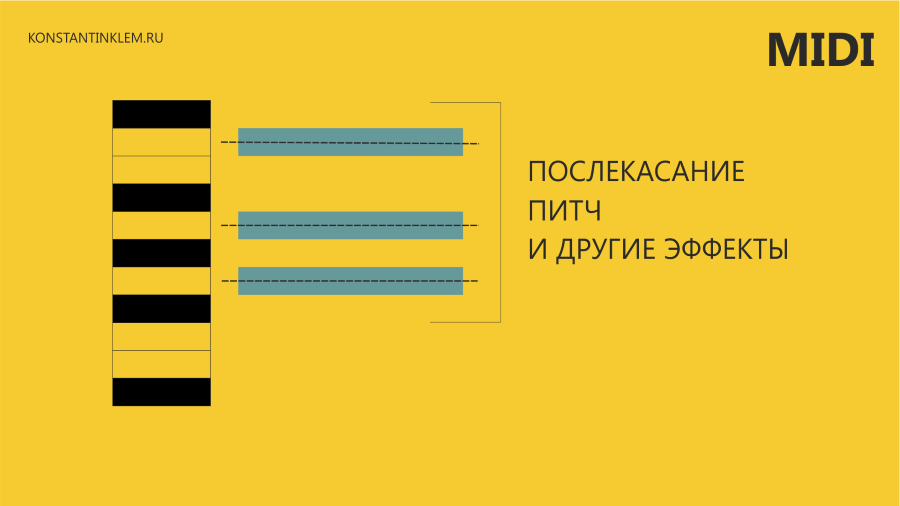 MIDI
MIDI
Спецификация MPE меняет эти правила. В MPE каждой ноте назначается собственный MIDI канал, соответственно появляется возможность одновременно влиять на указанные выше параметры (т.е. aftertouch, pitch bend и ряд других эффектов) для каждой вводимой ноты в аккорде. Появление экспрессии при работе с MIDI открывает большие возможности для саунд-дизайна. С помощью контроллеров, которые поддерживают MPE можно придавать плагинам характер живых инструментов.
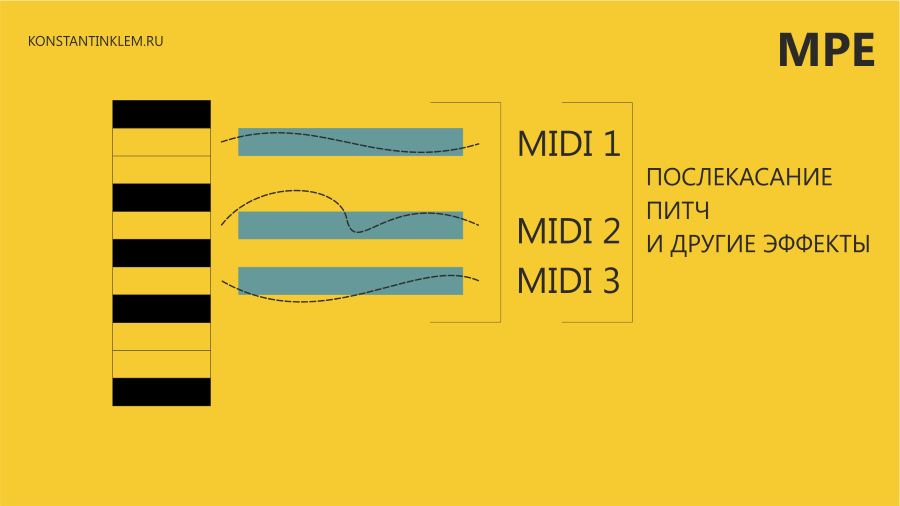 MPE
MPE
Теперь Ableton Live поддерживает MPE для всех совместимых плагинов и контроллеров. Из инструментов входящих в редакцию Live Suite MPE поддерживают синтезатор Wavetable, Sampler, Simpler и эффект Arpegiator. В части MPE обновился и контроллер Ableton Push 1/2 – теперь он поддерживает полифоническое послекасание.
Новые инструменты и эффекты
Hybrid Reverb — сочетает в себе конволюционный и алгоритмический ревербы. Эффект позволяет эмулировать, как реальные, так и не реальные пространства. Два реверба можно смешивать.
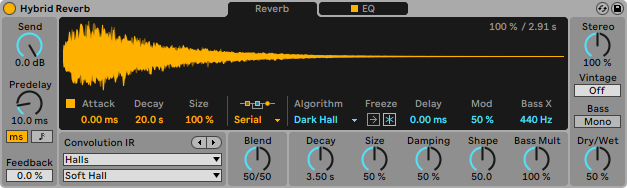 Эффект Hybrid Reverb
Spectral Time — делит звук на части и отправляет их на дилей, который срабатывает в зависимости от выбранной частоты. Результатом работы эффекта являются текстура напоминающая «металлическое» эхо, либо реверб со смещенной частотой. Эффект снабжен кнопкой ‘Freeze‘.
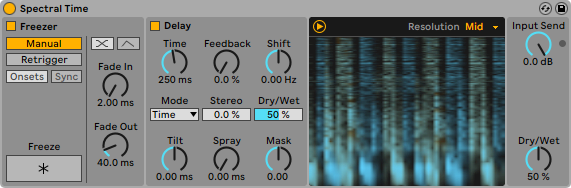 Эффект Spectral Time
PitchLoop89 — основан на ранних цифровых процессорах эффектов. Создает glitch звуки и интересные цифровые текстуры. Позволяет добавить окрас в звук используя модифицированный эффект Vibrato. Создан в сотрудничестве с Robert Henke (Robert Henke стоял у истоков создания Ableton, автор множества эффектов Max For Live, включая Granulator I и II).
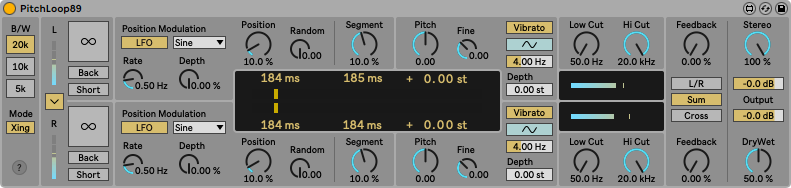 Эффект PitchLoop89
Spectral Resonator — эффект трансформирует звук разделяя его спектр на части, затем растягивает и смещает его. Полученным результатом можно манипулировать с помощью MIDI сообщений.
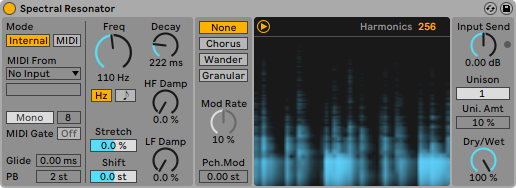 Эффект Spectral Resonator
Inspired by Nature — 6 Max For Live инструментов и эффектов «вдохновленных самой природой». Созданы в сотрудничестве с Dillon Bastan.
Помимо добавления новых инструментов и эффектов были обновлены и стандартные. В частности, обновлены эффекты Redux, Chorus, а Phaser и Flanger были объединены в один эффект. Обновлены так же интерфейсы всех инструментов созданных в сотрудничестве с Applied Acoustic Systems (создатели популярного VST инструмента Chromaphone).
Больше возможностей для живых выступлений
Синхронизация темпа
Теперь Live способен «слушать» входящий аудио сигнал и подстраиваться под его темп в реальном времени. В настройках достаточно указать, под темп какого инструмента Live должен подстраиваться (например, snare барабанной установки), а затем нажать кнопку Follow в верхней части меню. Готово! Теперь Live пляшет под барабанную установку, а не наоборот.
Сохранение макро параметров и улучшение стоек Rack
Появилась возможность сохранять положение ручек макро параметров и легко переключаться между ними. Ранее для этого требовалась отдельная Max For Live утилита. Особенно радует, что количество регулируемых макро параметров в рэковой стойке увеличено с 8 до 16!
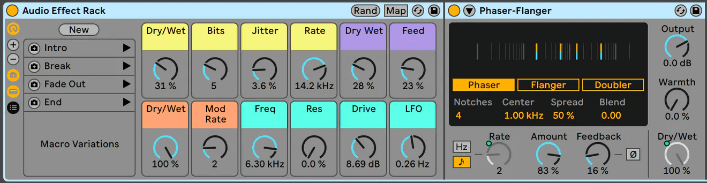 «Снимки» положения ручек управления макро параметрами
Follow Actions
Функция Follow Action теперь может быть привязана к длине клипа, что позволяет создавать интересные последовательности воспроизведения. Добавлен новый триггер Jump. Follow Action теперь работает не только с клипами, но и со сценами.
Улучшение MIDI редактора
В MIDI редакторе появились интересные нововведения — теперь можно устанавливать вероятность воспроизведения той или иной ноты, а так же вероятность изменения параметра velocity. Проще говоря — прозвучит нота или нет, а так же, как сильно она будет нажата, выбирает компьютер, а вы лишь указываете вероятность. Это позволяет сделать ваши MIDI клипы более живыми.
В Live появилась функция Scale, которая содержит коллекцию звукорядов/ладов. Live подсвечивает последовательности звукорядов тем самым упрощая работу с аккордами.
Контроль ресурсов компьютера
Как же не хватало этого индикатора! Live теперь способен подробно отслеживать, как расходуются ресурсы компьютера. На главном окне отображается общее и среднее значение использования CPU, а рядом с каждой дорожкой отображается индивидуальный измеритель использования процессора.
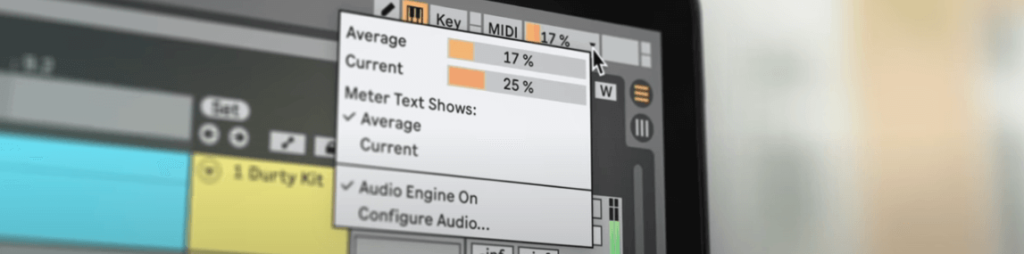 Измеритель использования CPU
What’s new in Live 11
Try Live 11 free for 90 days
The Live 11 Suite trial includes all the features of the full version, including saving and exporting. You can use it alongside your current version of Live.
Create your perfect take
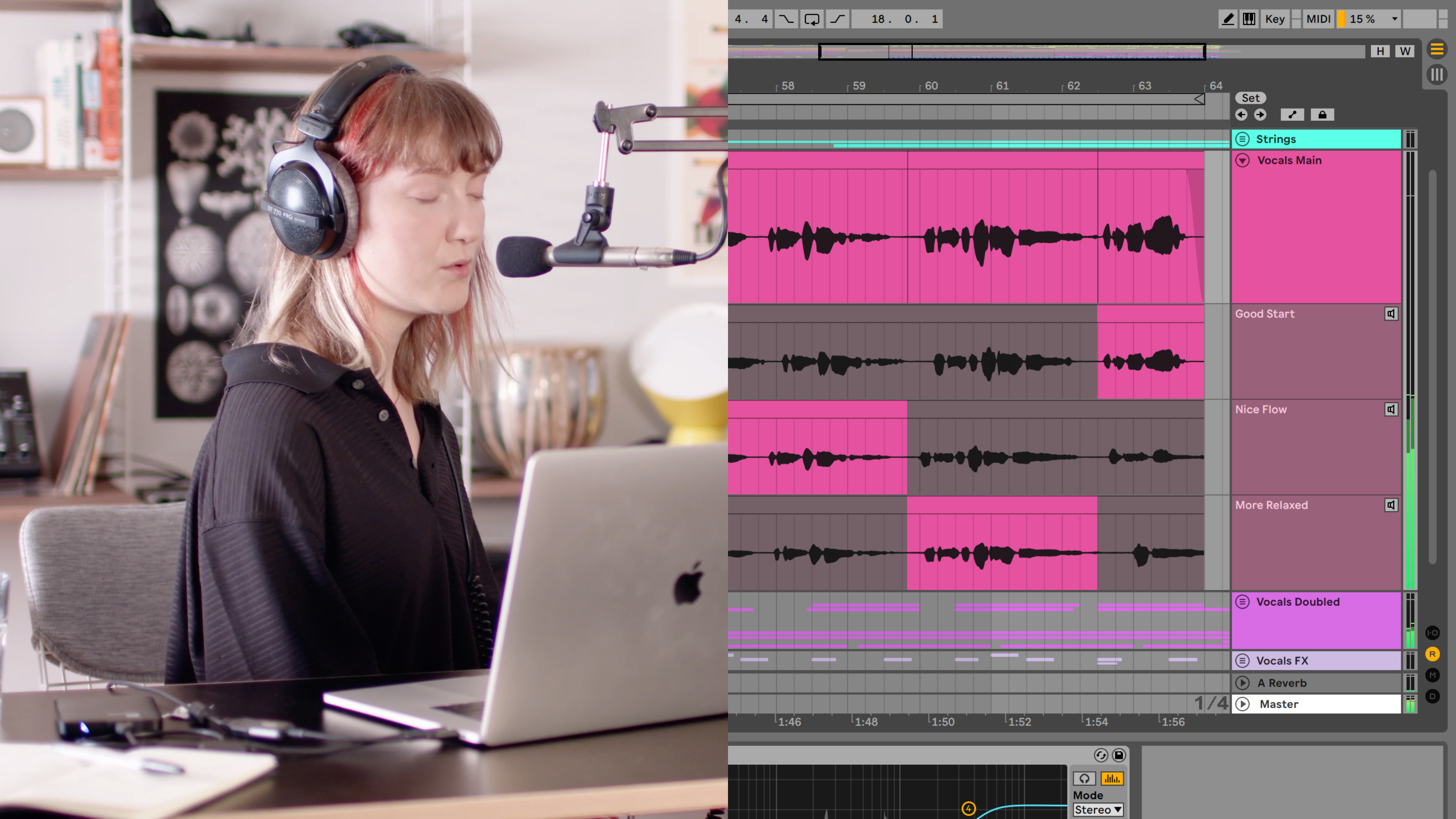
Artist records and edits multiple takes of her voice and a MIDI keyboard using comping
Take recording and comping
Live organizes multiple passes of an audio or MIDI performance into individual takes. Pick the best moments of each performance and combine them to create your perfect take. Or approach sound design in a new way by splicing together random samples from your library.
Linked-Track Editing
Link two or more tracks to edit their content simultaneously. This makes editing multi-tracked instruments or performances with multiple musicians easy and fast whilst keeping everything in time across tracks. This feature also works for MIDI tracks.
Add more feeling to your music
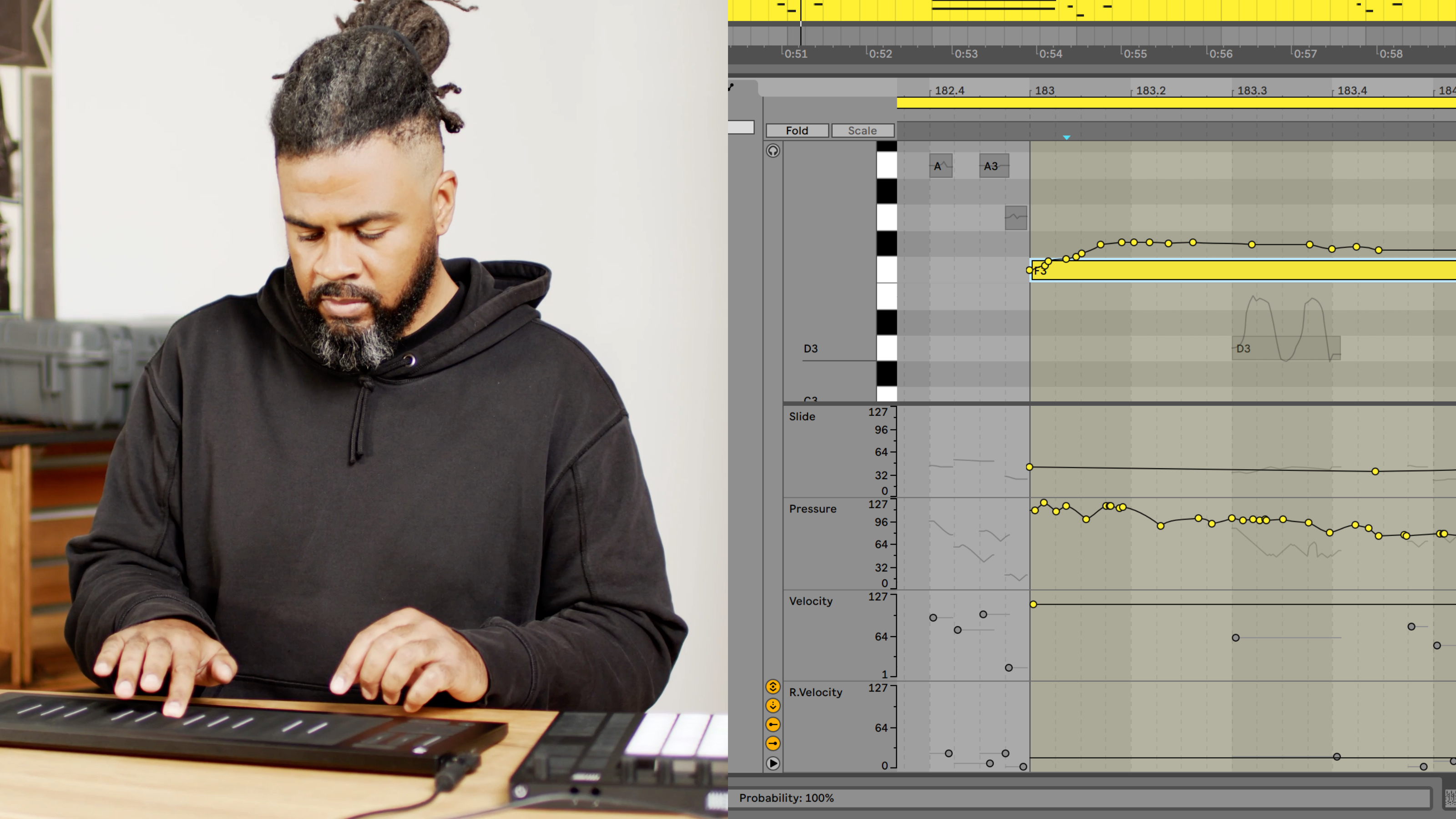
Artist demonstrates MPE using a Roli Seaboard, Push and Live 11’s new Note Expression View
Use your MPE-capable controller
Plug in your MPE-capable controller and immediately add bends, slides and pressure for each individual note in a chord. Add subtle expression variations, morph between chords and create evolving sonic textures.
What is MPE?
MPE stands for MIDI Polyphonic Expression. This way of using MIDI allows MPE-capable devices to control multiple parameters of every note in real time for more expressive instrumental performances.
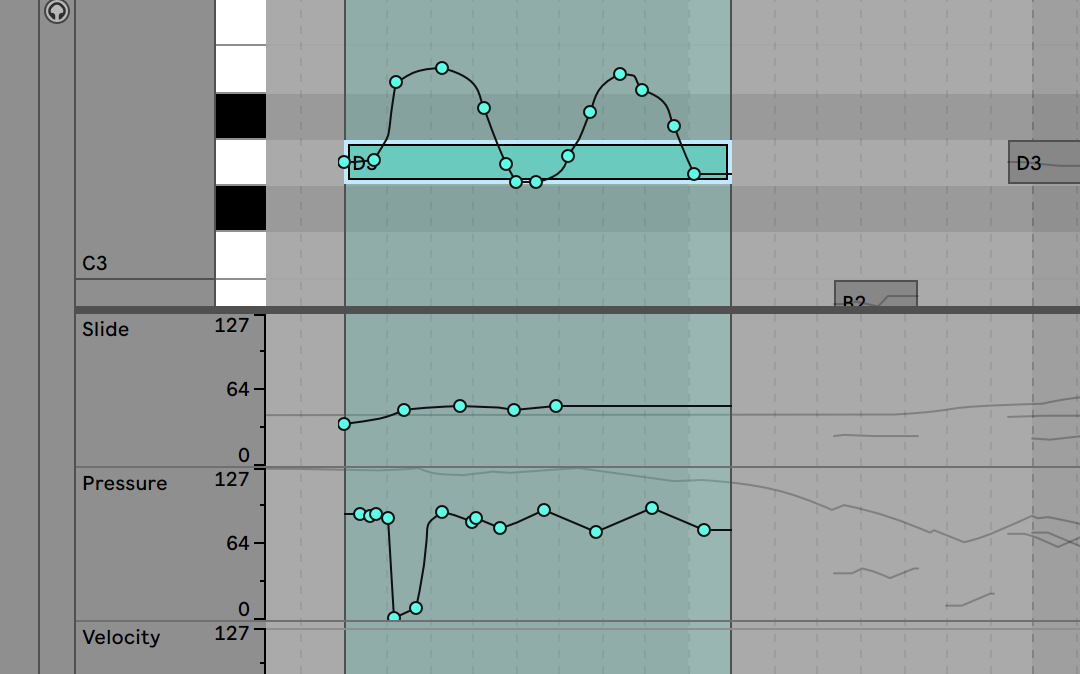
Note Expression View
Edit the pitch, slide and pressure envelopes of each note to refine the expression of your takes. Or take your sound design further by sequencing polyphonic sound variations.
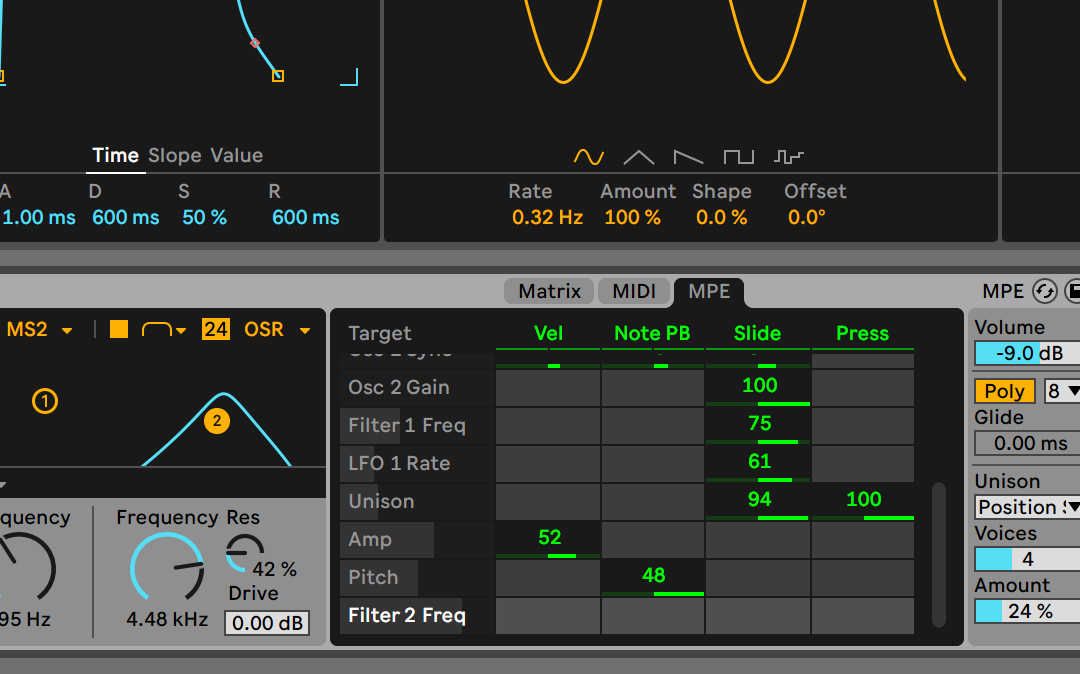
More expressive sounds included
Wavetable, Sampler and Arpeggiator are all updated to support MPE. And Live comes with MPE presets for each device that bring new dimensions of interaction and playability to your sound. The new expressive possibilities also enable polyphonic aftertouch on Push.
Experiment with new devices
Hybrid Reverb
Hybrid Reverb combines convolution and algorithmic reverbs. Place your sounds in any space, from accurate real-life environments to those that defy physical reality. Use the algorithmic side to add control and modulate the reverb tail, run it in parallel or in series with the convolution side, or play Hybrid Reverb like an instrument for real-time sound design.
Select a sound to hear it with various Hybrid Reverb presets:
Ableton live 11 что нового
To see highlights of the release in more detail, visit the Live 11 page
Comping
Comping
Live organizes multiple passes of an audio or MIDI performance into individual takes. Combine the best of many takes or find creative new combinations.
Linked-track editing
Link two or more audio or MIDI tracks to edit or comp their content simultaneously.
MPE compatibility
Add bends, slides and pressure for each individual note in a chord. Add subtle expression variations, morph between chords and create evolving sonic textures.
Expression View
Add and edit pitch, timbre and pressure variations of individual notes directly in a new tab in the Clip Detail View.
MPE-capable native devices
Wavetable, Sampler and Arpeggiator now support MPE. Use Push’s pad pressure to control parameters per note.
New devices
Hybrid Reverb
Combines convolution and algorithmic reverbs, making it possible to create any space, from accurate real-life environments to those that defy physical reality.
Spectral Resonator
Breaks the spectrum of an incoming audio signal into partials, then stretches, shifts and blurs the result by a frequency or a note in subtle or radical ways. Play it like an instrument with MIDI.
Spectral Time
Transforms sound into partials and feeds them into a frequency-based delay, resulting in metallic echoes, frequency-shifted and reverb-like effects. The Freeze function captures and holds audio.
Inspired by Nature
Six playful instruments and effects that use natural and physical processes as their inspiration. Created in collaboration with Dillon Bastan.
PitchLoop89
Based on an early digital effects processor, this device creates jittery glitch effects, delayed digital shimmers and outlandish vibrato to add character to sounds in the studio or onstage. Created in collaboration with Robert Henke.
Updated devices
Chorus-Ensemble
The updated version of Chorus now has a wider range of sound shaping capabilities – add vibrato, spread the left and right channels of the signal across the stereo field, and add thick 3-delay line chorus.
Redux
Redux adds a wider range of sounds from vintage digital gear including harsh distortion, digital and aliasing artifacts, as well as warm and saturated 8-bit textures.
Phaser-Flanger
Phaser and Flanger have been combined and now feature a new, lusher sound with increased frequency and modulation ranges, expressive improvements on existing modes, and a new Doubler mode for short modulatable delay.
Rack improvements
Macro Variations
Store the state of Macros for later recall – this is a fast way to create instant variations to sounds, or builds and drops during a performance.
Flexible Macro Configuration
Set your Racks up to have between 1 and 16 Macros.
Randomized Macro values
Randomize the state of your Macros or map the randomization button to MIDI.
Live tempo following
Tempo following
Live listens to and adjusts its tempo based on incoming audio in real time, making it a dynamic part of the band instead of the tempo source that everyone has to follow.
Chance tools
Note chance
Set the probability that a note or drum hit will occur and let Live generate surprising variations to your patterns that change over time.
Velocity chance
Define ranges for velocity probability for subtle, humanized variations in the dynamics of your patterns.
Follow Actions
Live 11 adds Scene Follow Actions for evolving arrangements. Follow Actions can now jump to specific clips and enable and disable Follow Actions globally.
New Sounds
Voice Box
A comprehensive collection of contemporary vocal samples from multiple voices, a set of playable vocal instruments, and Effect Racks designed for vocal processing.
Mood Reel
Evocative layered instruments that combine organic and synthetic sounds with textural elements to add mood, space and movement to productions.
Drone Lab
Sustained tonal and textural samples, generative noise, multisampled instruments, plus devices and Effect Racks designed for experimentation.
Upright Piano
Upright Piano is close-recorded for an intimate feel – a classic sound that is at home in many styles of music. Created in collaboration with Spitfire Audio.
Brass Quartet
This instrument highlights the natural breathiness, range of expression and broad tonality of the brass quartet. Created in collaboration with Spitfire Audio.
String Quartet
This combination of two violins, viola and cello has a sound that is immediately intimate, and is also a great starting point for sonic exploration. Created in collaboration with Spitfire Audio.
Updated Sounds
Updated Core Library
Live’s Core Library is expanded with a focus on contemporary music production, including new drum kits, Instrument Racks, Audio Effect Racks, Grooves, loops and MIDI clips. Plus, improved browsing makes sounds easier to find.
Updates to AAS instrument interfaces
The user interfaces of all instruments made in collaboration with Applied Acoustic Systems have been updated.
Updated Packs
Drum Booth features a new MIDI drum library and mix-ready presets. Grand Piano and Electric Keyboards now come with MIDI licks, phrases and progressions. MIDI drum grooves and instrumental parts have been added to Chop and Swing, Skitter and Step, Drive and Glow.
More Additions
Refined clip editing
Edit loops of multiple clips simultaneously, focus on a single clip in context and easily transpose entire arrangements from one piano roll.
Improved Clip Detail View
New tabs for Note Parameters, Follow Actions, Envelopes and MPE provide a clearer overview of and access to parameters and properties of a Clip.
Improved CPU metering
An updated master display can now show current and average CPU usage, plus per-track CPU meters show which tracks in a set use the most processing power.
Keys and scales
Use scales directly in Live’s MIDI editor as a guide or reference – this is linked to Push, and can be changed per clip.
Changes to Push
Visualizations for new devices
See visualizations of key parameters in Hybrid Reverb, Spectral Resonator and Spectral Time on Push’s color display and control them directly from the hardware.
Key and Scale sync
The Key and Scale feature in Live 11 is linked to Push and can be changed per clip.
Polyphonic aftertouch support
Apply different levels of aftertouch to individual notes when using Wavetable, Sampler, Arpeggiator and supported VSTs for more nuanced and dynamic performances on Push.
See up to 16 Macros
In Live 11, access Macros 9-16 from a second page after the Rack page with Macros 1-8. The second page appears automatically once you map more than eight Macros.
New in Max for Live
New API additions
A redesigned, MPE-compatible note API gives Max for Live access to Live 11’s new note features: probability, velocity deviation, and release velocity. You can also now access slices of a sample loaded in Simpler, a clip or sample’s warp markers, and much more.
MIDI Channel Routings
It is now possible to route MIDI to and from Max for Live audio effects and instruments. Inputs and outputs are routable and show up in a track’s MIDI From and MIDI To choosers.
Improvements for Device creators
A new live.scope object adds an oscilloscope to the object library. Double-clicking an error in the Max Console jumps the cursor to the device causing the error. A new Max for Live category in the Inspector Window allows developers to more clearly indicate which systems their devices can be used on, and much more.
Performance improvements
A complete overhaul of Max for Live’s user interface integration means a smoother experience when working with Max for Live devices, including improvements to focus, positioning, scrolling behaviour, and performance.
Try Live 11 for free
Get all the features of Live 11 Suite free for 90 days.
Ableton Live 11 получит новые функции «записи, исполнения и экспериментирования»
Войдите в свой аккаунт
Крупное обновление DAW приносит поддержку MIDI MPE, новые устройства и полезные навыки гуманизации и рандомизации исполнения.
Спустя почти три года после выпуска десятой версии программы компания Ableton представила крупное обновление Ableton Live 11. Разработчики добавили в программу новые возможности и устройства, а также доработали уже существующие функции. По словам создателей, обновление сосредотачивается на предоставлении новых возможностей «записи, исполнения и экспериментирования».
Первым заметным нововведением стала обновленная функция Comping для объединения аудио. Программа научилась организовывать многочисленные повторы аудиофайлов и MIDI-регионов в отдельные дубли. Пользователи могут смешать лучшие части полученных дублей для получения «идеально исполненной» партии. В дополнение к этому Ableton Live научился связывать два и более треков между собой для их одновременной обработки.
Ableton Live 11 получил полную поддержку стандарта MIDI Polyphonic Expression (MPE). В программе появилась новая рабочая область Expression View, позволяющая работать с различными огибающими для достижения необходимого уровня экспрессии. Встроенные сэмплер, арпеджиатор и таблично-волновой редактор также получили полную поддержку MPE.

Что касается новых устройств, программа пополнилась десятью новыми девайсами. Hybrid Reverb позволит создавать алгоритмические и конвульсивные пространственные эффекты. Spectral Resonator разобьёт аудио на несколько частей для их дальнейшего изменения по времени на основе частоты звука. В свою очередь Spectral Time умеет работать с разбитыми частями и создавать на их основе интересные эффекты задержки.
Для любителей креативной и экспериментальной обработки создатели обновления добавили коллекцию инструментов и эффектов Inspired By Nature. Источником вдохновения для девайсов коллекции стали различные природные и физические звуковые явления. В дополнение к этому программа получила инструмент PitchLoop89, объединяющий глитчи, дилэй и вибрато.
Для сценических и концертных нужд Ableton Live 11 получил функцию Live Tempo Following. Согласно описанию разработчиков, программа научилась «слушать» поступающее аудио от других исполнителей и инструментов на сцене и автоматически подстраивать на основе полученного сигнала темп. В случае, если кто-то станет играть быстрее или медленнее, Ableton самостоятельно настроит темп, чтобы партии звучали слаженно.
Новая функция Macro Snapshots позволяет сохранять копии макросов для их последующего использования. В рамках рэка может храниться до 16 макросов, при этом их запуск и работа могут быть полностью рандомизированы.
Разработчики расширили систему автоматизации, внедрив инструмент Follow Actions. С его помощью пользователи могут задать, какие именно действия будут сделаны после определённого события.

Ещё одно нововведение — функция Note Chance, направленная на гуманизацию исполнения. Функция устанавливает вероятность срабатывания и звучания любого звука в рамках проекта или партии, благодаря чему Ableton Live генерирует многочисленные вариации одного паттерна. Более того, Note Chance можно настроить таким образом, чтобы паттерн менялся с течением времени.
Вместе с Note Chance в программе появилась функция Velocity Chance, которая меняет скорость извлечения звука в MIDI-регионах на основе заданных настроек. Одновременная работа Note Chance и Velocity Chance позволит создать уникальные и не повторяющиеся паттерны, а также облегчит оживление MIDI-партий.
Среди других обновлений Ableton Live 11 можно отметить инструменты Voice Box для создания инструментов и рэков на основе вокала, Mood Reel и Drone Lab для генерирования текстур. В комплекте с программой также будут поставляться виртуальное пианино Upright Piano, а также струнные и духовые квартеты Brass Quartet и String Quartet. Последние три инструмента созданы совместно с компанией Spitfire Audio.

Разработчики отмечают, что новая версия принесёт доработанные инструменты и девайсы из предыдущих версий, а также обновлённую и расширенную библиотеку контента. Ряд улучшений также затронули редактирование клипов и систему метеринга нагрузки на процессора компьютера. В редакторе MIDI появились подсказки с гаммами, ладами и звукорядами, сообщающие, какие ноты «подойдут» под текущую тональность проекта.
Релиз Ableton Live 11 намечен на начало 2021 года. Программа выйдет в трёх редакциях:
Для зарегистрированных пользователей Ableton Live 9 и Ableton Live 10 компания предложит специальные цены на обновление до новой версии.
После анонса обновления компания временно снизила цены на 10-ю версию программы, которая теперь продаётся со скидкой 20%. Все покупатели лицензии на Live 10, оформившие заказ после 10 ноября 2020 года, смогут бесплатно обновиться до Live 11 после выхода обновления.
Получить больше подробностей об обновлении можно на официальном сайте Ableton.
Live 11 Beta Release Notes
11.1b7 Release Notes
New features and improvements:
Bugfixes:
11.1b6 Release Notes
New features and improvements:
Bugfixes:
11.1b5 Release Notes
New features and improvements:
Bugfixes:
11.1b4 Release Notes
New features and improvements:
Bugfixes:
11.1b3 Release Notes
New features and improvements
Native Apple Silicon Support
Live 11.1 adds native support for Apple M1 computers.
Note: The beta auto-update from 11.0.10b3 is still based on the Intel architecture. If you are on an M1 machine, please download the universal installer from Centercode.
Arrangement View Improvements
You can use the Arrow Left key to navigate from an automation lane or take lane to the main track, this will fold the lanes as well. You can also use the Arrow Left key to navigate from tracks in a group to the main Group Track.
The Arrow Left/Right shortcut has been added to the Arrangement Track Title Bar info text. The shortcut folds/unfolds the track.
The Arrow Left/Right shortcut has been added to the Toggle Additional Automation Lanes info text. The shortcut folds/unfolds additional automation lanes.
Browser
A new Devices icon has been added to Live’s Browser:
When viewing Sets in the browser, you will see a Devices icon for device chains on a track that contain at least one device.
When you expand a Live Set in the browser, either from the Current Project folder, Templates folder, or a folder of Sets you have added in Places, you can unfold the tracks in the Set to reveal their device chains. These chains can then be moved into the current open Set using drag and drop or by double-clicking on the chain. The Device settings from the original Set are retained but any previously recorded automation is not.
Capture MIDI
In the first captured MIDI clip (in an empty set with the transport stopped), if the detected loop is eight bars or less, the first played note is considered the start of the loop.
When only one note is played in the first captured MIDI clip (in an empty set with the transport stopped), the loop boundaries are set to the note start and end, and the tempo is accordingly calculated, resulting in a one, two, four, or eight bar loop. This is particularly useful when playing a rhythmical sample with a single MIDI note.
In Session View, new captured clips now use the “Adaptive Grid: Narrow” setting instead of “Fixed Grid: 1/16.”
Clip View
Added responsive Clip View options:
In Clip View, all clip properties are now displayed in tabs instead of additional panels. The tabs in Clip View can be arranged vertically or horizontally by selecting “Arrange Clip View Panels Vertically” or “Arrange Clip View Panels Horizontally” from the View menu.
When Clip View panels are arranged vertically, the individual tabs (e.g. Clip, Audio, Envelopes, etc) can be collapsed and expanded using the arrow icon to the right of the tab header.
When Clip View panels are arranged vertically, the individual tabs (e.g. Clip, Audio, Envelopes, etc) can be folded/unfolded using the Arrow Left/Right keys.
Sample information for audio clips (e.g. sample name, sample rate, etc) is also displayed in the Clip View and appears differently in the vertical/horizontal view modes.
Clip View panels can now be accessed using keyboard shortcuts. In MIDI clips, ALT + 1 switches to the Notes panel, ALT + 2 switches to the Envelopes panel, and ALT + 3 switches to the Note Expression panel. In audio clips, ALT + 1 switches to the Sample panel and ALT + 2 switches to the Envelopes panel.
The chosen Responsive Clip View mode is now saved in Live’s Preferences.cfg file.
When multiple audio clips are selected, the sample properties (sample rate, bit depth, and channel count) for all samples will be displayed in the Clip View. If a value is not the same for all samples, the character “*” will be displayed. In Clip View, you will also see the total number of samples selected.
Comping
You can now duplicate selected take lanes using the keyboard shortcuts CMD + D (Mac) / CTRL + D (Win), or by right-clicking on the take lane header and selecting “Duplicate.”
Changing the color of a clip in a take lane changes the color of the corresponding clip in the track’s main lane and vice versa. Splits are created on the updated clips in certain cases when the relation between other highlights on different clips change.
The horizontal lines that separate multiple take lanes match the color of the clips that are in those lanes.
When renaming multiple tracks or take lanes using the context menu option, you will see the edit field when you right-click on a track or take lane.
Control Surfaces
When navigating between devices on a selected track with the PreSonus ATOM SQ, you can now scroll between devices by holding the navigation buttons down.
If an invalid CC, note, or channel value is used in a UserConfiguration.txt file, the associated User Remote Script can still be loaded.
CPU Meter
The CPU meter drop-down menu now can be customized to display:
both the Average or Current CPU usage levels
only the Average level, with the Current level switched off
only the Current level, with the Average level switched off
Alternatively, the CPU meter can also be switched off entirely.
By default, Live will not display the Current level; it must be enabled from the drop-down menu.
Interface
You can use the left and right arrow keys to navigate radio buttons anywhere in Live. If you are navigating radio buttons on a device that is inside of a Rack with the left and right arrow keys, you can get back to moving between devices in the Rack using the left and right arrow keys by hitting the ESC key.
In Session and Arrangement View, the Monitor radio buttons now have a default state that can be restored. When the In/Out section is expanded, you can press the Delete key to reset the Monitor radio buttons to the default (“Off” for audio tracks and “Auto” for MIDI tracks). This option is also accessible via the Edit menu option “Return to Default.”
The Quantize Settings dialog buttons in the MIDI Note Editor now say “Apply” and “Close” instead of “OK” and “Cancel.”
Deactivated device title bars are easily readable in all Live Themes, even if the device is selected.
An error message will be displayed in the status bar if an auto-update cannot be downloaded.
Added a new «MIDI Envelope Auto-Reset» entry to the Options menu:
When enabled, certain MIDI control message types that are not automated for a given clip will automatically reset at the start of a new clip.
Note: for users who intentionally work opposite to this behavior, enabling this change will make corresponding Live Sets behave differently.
In Live 11.0.5, «MIDI Envelope Auto-Reset» is disabled by default.
In Live 11.1, «MIDI Envelope Auto-Reset» is enabled by default for new Sets, and disabled by default in older Sets.
Updated various info texts.
Updated some Help View lessons.
Core Library
Max for Live
Updated the bundled Max build to version 8.2.0 Beta 665eec0.
It is now possible to call select_notes_by_id on a Clip object in Max for Live, passing a list of note IDs. This will select only those notes that have the provided IDs.
Link functions have been added to the Max for Live API.
You can access the IDs of newly created notes using the Python API or the Max for Live API.
It is possible to get a dictionary of all the notes in a MIDI clip using the Python API or Max for Live.
When Max fails to load, an error message will be displayed that contains a link to a Knowledge Base article that explains potential causes for the issue and steps to take to resolve it.
Error reporting in the Max Window is more consistent.
Four new theme colors are available in Max for Live.
: ‘realtime_params’ attr for realtime report of parameter data from outlets
Dynamic Colors: ability to use a name which references a dynamic color (follows Live or Max color themes)
/ live.adsrui: new objects
Added an MPE Settings dialog box to the I/O section of Live’s mixer. You can use the settings to:
configure the MPE zone and range of note channels used by Live when sending MPE to an external MIDI device or plug-in
select the upper or lower zone and number of note channels
select multi-channel mode, which sets an arbitrary range of note channels
The above MPE settings can be used for hardware synths that require a specific MPE configuration, or plug-ins that do not officially support MPE but can be used with MPE controllers due to their multi-timbral support.
Multi-Clip Editing
Time selection interactions, note selection interactions, and new note editing options have been added to multi-clip editing:
Time in the MIDI Note Editor can be selected across loop and clip boundaries.
Note editing (e.g. copy, cut, paste, delete) can be used when working with note selections across clips and loop boundaries.
Notes can be cut or copied from multiple clips and inserted into the same set of clips, as long as the clip selection/foreground clip has not changed, or into a different clip once that new clip has been selected.
Selected loop bars can now be duplicated using the context menu or the CMD + D (Mac) / CTRL + D (Win) keyboard shortcuts.
In Arrangement View, it is possible to draw notes in background clips without first changing the foreground clip. Notes can also be drawn continually across clip boundaries, except in Focus Mode.
When using a pen to draw notes with «Draw Notes with Pitch Lock» enabled, any notes that cross a loop boundary are no longer deleted.
When more than 64 clips or eight tracks are selected in Arrangement View, the MIDI Note Editor is no longer available for multi-clip editing to prevent potential performance issues.
New Devices and Device Improvements
Introduced «Shifter», a new audio effect in Live Standard and Suite. Shifter is a multi-purpose audio effect for pitch shifting, frequency shifting, and ring modulation. The pitch or frequency of incoming audio can be tuned using Coarse or Fine parameters and further adjusted with a Tone filter and Window parameter. Shifter also has Delay, LFO, and Envelope Follower sections for additional modulation. The Shifter device can set pitch or frequency using its own parameters or by incoming MIDI notes.
Introduced the Align Delay device, which is now included in the set of Max for Live devices that come with a Suite license, or a Standard plus Max for Live license. Align Delay is a Max for Live device that delays incoming signals by samples, milliseconds, or meters/feet.
Introduced the MIDI Shaper device, which is now included in the set of Max for Live devices that come with a Suite license, or a Standard plus Max for Live license. MIDI Shaper is a Max for Live MIDI device that uses multi-breakpoint envelopes to generate mappable modulation data.
The Cytomic Filters, which are used in the Wavetable, Echo, Simpler, Sampler, Operator, and Auto Filter devices, have been updated and improved in stability, sound and performance. As of 11.1, the Cytomic filters (particularly the MS2 and SMP options) might deviate in sound compared to previous Live versions, especially when driven hard.
An update to the Softtube libraries may cause subtle sound changes in the Amp and Cabinet audio effects.
In the Sampler, Wavetable, Impulse, Simpler, Channel EQ, Hybrid Reverb, Chorus-Ensemble, Phaser-Flanger, Echo (output knob only), and Spectral Resonator (input send only) devices, Gain controls now increment/decrement consistently by 1 dB when pressing the up/down arrow key, or by 0.1 dB when pressing the Shift key.
The effect order can now be reversed using two radio buttons “Frz > Dly” or “Dly > Frz” on the right panel of the Spectral Time device above the Dry/Wet knob.
A “Zero Dry Signal Latency” option has been added to the context menu in the Spectral Time device. Enabling it reduces the latency of the dry signal to zero instead of syncing it with the output of the effect. This option is useful when playing a live instrument through Spectral Time and monitoring the output.
In the Spectral Resonator device, the Shift parameter will now increment/decrement by one semitone when pressing the up or down arrow keys, or by one octave when holding the Shift key.
A context menu option for Hi-Quality mode has been added to the Wavetable device. When Hi-Quality is off, Wavetable modulation is calculated every 32 samples. Low-power versions of the Cytomic filters are also used to further reduce CPU. Using Wavetable with Hi-Quality mode off can save up to 25% CPU compared to having it enabled, which is ideal for working with large sets or maintaining low latencies. Please note that as of 11.1, Hi-Quality mode will be off by default when loading a new instance of Wavetable or any of its Core Library presets. However, any user presets or Live Sets created previously will still load Wavetable in Hi-Quality mode to ensure sound consistency with earlier Live versions. Subtle sound differences may occur when Hi-Quality mode is enabled.
Push Device Visualization
On Push 2, the Hybrid Reverb parameter banks Algorithm 1 and Algorithm 2 have been renamed to Algorithm Pg 1 and Algorithm Pg 2. Also some parameters for Hybrid Reverb on Push 2 have been rearranged for easier navigation.
Updated some parameter names for the Chorus-Ensemble device on Push 2.
The Saw Up and Saw Down icons for Sampler’s LFO waveforms on Push 2 now appear as expected.
Session View Improvements
Using the Arrow Left/Right keys to navigate the Session View no longer skips return tracks, if they are visible.
Multi-selecting scenes now behaves the same as multi-selecting clip slots.
Selecting scenes no longer highlights the Master track, instead the scene itself is highlighted.
Navigating from the last clip slot to a scene with the Arrow Right key will highlight the Master track.
You can click on a scene number or the Master track header to access the Master track and Scene View panel.
Setup
To avoid incompatibilities, you will be asked to save Live Sets created with an older version of Live as a new file in Live 11.1.
In Live’s Preferences, file paths that are unavailable (e.g. if an external drive is not connected) display a “(not available)” message. Paths that haven’t been set yet display a “(not set)” message.
Bugfixes
Live Bugfixes
Devices that use beat sync divisions now remain in sync when the device is re-enabled during playback.
The Filter LFO dropdown menu in the Tension device now appears as expected.
Previously, when merging a device chain containing no instrument with another device chain containing an instrument, the instrument would be deleted from the merged chain.
Live no longer moves samples from a temporary project to the final saved project folder.
Fixed a bug that created file path issues with the Live Recordings temporary folder if it was also saved and renamed in Places.
The undo text for changed clip colors has been corrected in the Edit menu.
Previously, if a plugin was grouped into an Instrument or Drum Rack, the MPE settings of the plugin were not retained when the Rack was saved as a preset.
Fixed a crash that occurred if non-supported MPE data (e.g. MIDI CCs other than Pitch, Slide, or Pressure) was sent to a Sampler/Simpler device.
Fixed a crash that occurred when clicking on a parameter in Live and adjusting the same parameter using an encoder on Push at the same time.
Fixed a crash that occurred if all return/delay tracks were deleted and then a track containing a take lane was duplicated and moved. Live would crash if undo was selected twice after duplicating and moving the track.
In the Filter/Mod section of the Delay device, a custom icon for the Ping Pong setting is now displayed on Push 2.
Fixed a crash that occurred when going to “Save Set as Template” from the File menu, then typing the name of the set, and finally pressing the [Escape] key twice to cancel the process.
Improved keyboard shortcut support for French keyboard layouts
Fixed a bug that caused peak CPU load to be calculated incorrectly if the buffer size selected in Live’s Preferences wasn’t a multiple of 64 samples.
Fixed a crash caused by loading multiple instances of certain VST3 plug-ins when Live’s transport was running.
Fixed an issue in Session View that caused notes to sometimes be triggered twice when recording a MIDI clip with both “Record Quantization” and “Chase MIDI Notes” enabled.
Fixed an issue caused when using multiple Control Surface scripts that are set to automatically arm MIDI tracks.
When highlighting an area of a take lane using Draw Mode, the clip name appears as expected.
Plug-ins that cannot be loaded appear with a standard device background that includes a more detailed error message.
In Arrangement View, the dialog box that appears when multi-clip editing is no longer available because more than eight tracks are selected appears as expected.
When several audio clips with different pitch values are selected, you will see the range of values for each clip highlighted in blue on the Pitch dial in Clip View.
Renaming take lanes in linked tracks works as expected.
Folded clips with long fades appear as expected.
Fixed an issue that caused clip fades to reset when resizing adjacent clips.
Fixed a crash caused by some VST3 plug-ins with certain undesignated MIDI CC mapping parameters.
The CTRL + 5 fixed/zoom adaptive grid keyboard shortcut works as expected on Windows.
Fixed an issue in Session View that caused notes to sometimes be triggered twice when recording a MIDI clip with both “Record Quantization” and “Chase MIDI Notes” enabled.
Fixed two bugs that caused the time selection to not be updated as expected when editing several clips compared to editing a single clip.
Max for Live Bugfixes
When the LFO device’s modulation waveform exceeds its minimum/maximum, it now draws a horizontal line, as is consistent with the Envelope Follower and Shaper devices. The MPE Control device no longer creates high CPU spikes when receiving MIDI CC 64 (Sustain).
Fixed various bugs that affected these bundled Max for Live devices: Envelope MIDI, LFO, Note Echo, and MIDI Monitor.
Fixed a bug with the Expression Control device.
Key events keep working when a selected Max for Live device becomes invisible.
Selected parameters of a Max for Live device can still be controlled by key events even if the device is no longer visible.
The correct return IDs of newly created notes will be added to new clips when using the Python API or Max for Live API.
Mapped waveforms in the LFO device appear as expected.
Setting the MPE Control device Pitch Curve to an S Curve shape works as expected.
Fixed an issue that could cause CPU spikes when using Channel Aftertouch in the MPE Control device.
: notifies parameter hub when device state changes
jit.gl.model: fixed file loading when embedded in M4L device
jsliveapi: eliminate crash when there’s no ‘this’ for operations
jsliveapi: improved handling of large strings
live.* UI objects: improve negative value handling with some units
live.* ui objects: Outputs the correct value when opened and initialized by pattr
live.banks: error reporting refinements
live.banks: fixed bank renaming in response to ‘-‘ argument
live.banks: fixed crash when adding a new bank with index 1 when banks are empty
live.banks: fixed crash with certain ‘edit’ messages
live.banks: fixed crashing with bad input
live.dial: fixed large mode automation drawing
live.drop: ensure value when restoring
: fixed delayed drawing after deletion
Max Console in Max for Live: long text wrapped and shows device name
Object Browser: Max for Live UI objects shown in correct category
Object Palette: icons added for all live.* UI objects
Parameters Window / Inspector: auto-quote Info Title / Info
Parameters: only dirty if it exists in a Max for Live device
Performance: CPU usage improvements after starting Editor
11.0.10b3 Release Notes
Bugfixes:
11.0.10b2 Release Notes
Bugfixes:
11.0.10b1 Release Notes
New features and improvements:
Bugfixes:
11.0.5b6 Release Notes
Bugfixes:
11.0.5b5 Release Notes
Bugfixes:
11.0.5b4 Release Notes
Bugfixes:
Core Library:
11.0.5b3 Release Notes
New features and improvements:
Bugfixes:
11.0.5b2 Release Notes
New features and improvements:
Bugfixes:
11.0.5b1 Release Notes
New features and improvements:
Bugfixes:
11.0.1b1 Release Notes
Bugfixes:
11.0b30 Release Notes
New features and improvements:
11.0b29 Release Notes
New features and improvements:
11.0b28 Release Notes
Bugfixes:
11.0b27 Release Notes
New features and improvements:
11.0b26 Release Notes
New features and improvements:
Added new presets for Analog, Collision and Operator
Added the following changes to Macro Control variations:
When any of the following plug-ins are loaded, MPE will be enabled by default in those devices:
Bugfixes:
11.0b25 Release Notes
New features and improvements:
Bugfixes:
11.0b24 Release Notes
New features and improvements:
The following markers now look slightly different:
Added some visual changes to the piano roll and MIDI Note Editor:
Bugfixes:
Fixed the following bugs in the MPE Control device:
11.0b23 Release Notes
New features and improvements:
Bugfixes:
11.0b22 Release Notes
New features and improvements:
: fixed freeze when setting names of objects (fixes Vector FM device)
Bugfixes:
11.0b21 Release Notes
New features and improvements:
Bugfixes:
11.0b20 Release Notes
New features and improvements:
Bugfixes:
When a time selection is set from the magnitude editors (velocity, probability)
A missing sample was reported when loading the Hybrid Reverb preset Voice Plate.adv
Some mod wheel mappings in Wavetable presets have been disabled
11.0b19 Release Notes
New features and improvements:
When there is a time selection in the MIDI editor: