
Инструкция для ошибки atidxx64.dll caused an Access Violation в Windows 7, 8,10
Преимущественно ошибка с указанием проблемного файла atidxx64.dll появляется в играх. В зоне риска оказались игроки Final Fantasy XIV, Call of Duty Ghosts, Battlefield 4, Genshin Impact, но никто от нее не застрахован, может появиться практически в любой игре. Как нам удалось выяснить, проблема заключается в видеодрайверах ATI Radeon (преимущественно), но бывают и другие, менее распространенные причины. Интересно то, что ошибка может появляться как в случайный момент времени, так и строго через определенный его промежуток. Кто-то пишет, что его выкидывает с игры через 30, другие – через 45 минут, а у некоторых ошибка выскакивает только в момент закрытия приложения. Несмотря на разнообразие условий появления, у нас есть решения, которые могут сработать.
Как может выглядеть ошибка:
Имя модуля с ошибкой: atidxx64.dll
Atidxx64.dll caused an Access Violation (0xc0000005)
Unhandled exception at 0x000007FEF41FAE4D (atidxx64.dll)
Как исправить ошибку файла atidxx64.dll?
Учитывая принадлежность описываемого сейчас файла к драйверам видеокарты, самым логичным решением будет попытка поработать с ним. У нас есть реальные примеры, когда это срабатывало, хотя при немного разных процедурах. Плюс мы выяснили, что проблема может быть в подключении оборудования, игровых файлах,
Обновление/откат драйверов видеокарты
Atidxx64.dll имеет прямое отношение к драйверам видеокарты. Похоже, что некоторые их версии больше подвержены появлению подобного рода ошибки, а значит – чистая переустановка имеет хорошие шансы на восстановление правильной работы игр.

После удаления видеодрайверов система будет работать с большими визуальными задержками и это нормально. Чтобы минимизировать время такого неприятного поведения, драйвера можно загрузить заранее.
Важно! Известны случаи, когда может сработать только конкретная версия видеодрайвера. Возможно, придется попробовать выполнить данную процедуру несколько раз. К примеру, кому-то помогла только версия 17.4.2.
Известно, что ошибка может появляться и в обратной ситуации – после недавнего обновления ПО видеокарты. Если это так, стоит попробовать откатить драйвер к более ранней версии. Благо, это сделать несложно.
Отказ старых технологий, вроде API Mantle от AMD
Начиная с Radeon Software Adrenalin 2019 Edition 19.5.1 от 2019 года, компания отказалась от API Mantle. Ранее на нее полагали большие надежды, но популярность он не обрел. Вынужденная поддержка на протяжении 6 лет была завершена. Сегодня до сих пор некоторые пользователи используют настолько старые драйвера, что в них есть неподдерживаемый 2 года API. Об этом говорит несколько отчетов пользователей. Решением станет чистая установка или обновление драйверов не обязательно до актуального состояния (если есть какие-то «противопоказания» к этому), но хотя бы до 19.5.1 и новее.
Еще одна рекомендация – удалить Omega Driver. Это неофициальный набор драйверов для ATI Radeon и NVIDIA. Если точнее, это не просто другие, а скорее модифицированные версии драйверов. Да, они действительно были достойными внимания в свое время, так как предлагали много дополнительных настроек и функций. Данное ПО официально не поддерживается с 2012 года, но остается актуальными для старых видеокарт. Похоже, это одна из возможных причин ошибки файла atidxx64.dll. Придется отказаться от подобного софта, чтобы исправить ошибку.
Замена нового файла atidxx64.dll на старый
Один из вариантов решения проблемы, который тоже направлен на драйвер, и это неудивительно, учитывая принадлежность файла к ним. Суть в том, чтобы попробовать обновить ПО, но сохранить старый файл atidxx64.dll или atidxx32.dll.
Если эффект не последовал, можно попробовать откатить драйвера к прошлой версии и установить новый файл atidxx64.dll. Иными словами, произвести обратную процедуру.
Дополнительные варианты решения проблемы
Несмотря на то, что первые упоминания ошибки с файлом atidxx64.dll начали появляться еще более 6 лет назад, до сих пор существует очень смутное представление о природе происхождения сбоя. Есть ряд случаев, в которых пользователи выполняли совсем другие действия и это им помогало. Нам ничего не остается, кроме как перечислить то, о чем уже есть положительные отзывы на форумах.
Что еще нужно попробовать:
Мы уже молчим про те способы, которые первыми приходят на ум: переустановить игру, обновить Windows, проверить системные файлы, переустановить Visual C++. Все это тоже можно попробовать, если все остальное не сработало. Их нет в данной инструкции по исправлению atidxx64.dll только из-за того, что мы не видели реального подтверждения результативности методов. Однако это не значит, что они действительно не давали эффектов. Пока это все, что мы можем предложить.
The Sims free downloads for windows
Download, update, repair your game and add missing DLC’s.
“Wizard” Anadius came up with a program enabling you to update and repair your game with just a few mouse-clicks.
No manual downloads, no copy/paste, the program does it all
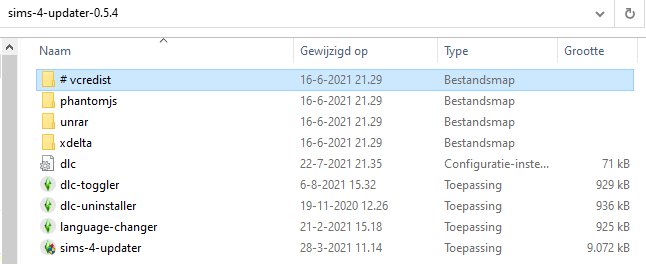 | Always check for the latest version of the updater, do not rely on previously downloaded versions. Latest Updater version: 0.5.4 Updater Download includes: Extract with Winrar or 7-Zip |
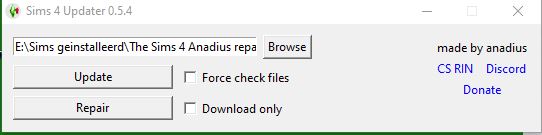 | Click on Browse and select your The Sims 4 Installation Folder Click on Update, this will also repair your game Language files will be installed if not already present. |
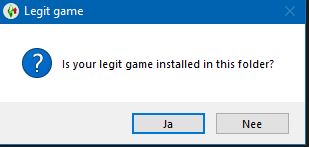 | With cracked games only, just click No The program shows an overview of non-installed DLC’s You can Add missing DLC’s Note for users with 32-bits WindowsBear in mind that Discover University, Tiny Living, Eco Lifestyle, Nifty Knitting, Star Wars, Snowy Escape, Paranormal, the kits and Dream Home Decorator can not be played on 32 bits Windows, so no need to download these DLC’s. Also note that the Legacy Edition is for 32 bits Windows only |
 | The program is now checking all your installed DLC’s for the latest update and adds the ticked items to your game
|
| Now play your updated/repaired game and you see that all DLC’s are in the game, even those DLC’s you have not installed.. From the download of the Updater, copy the files dlc and dlc-toggler to your installation folder. Run the dlc-toggler | |
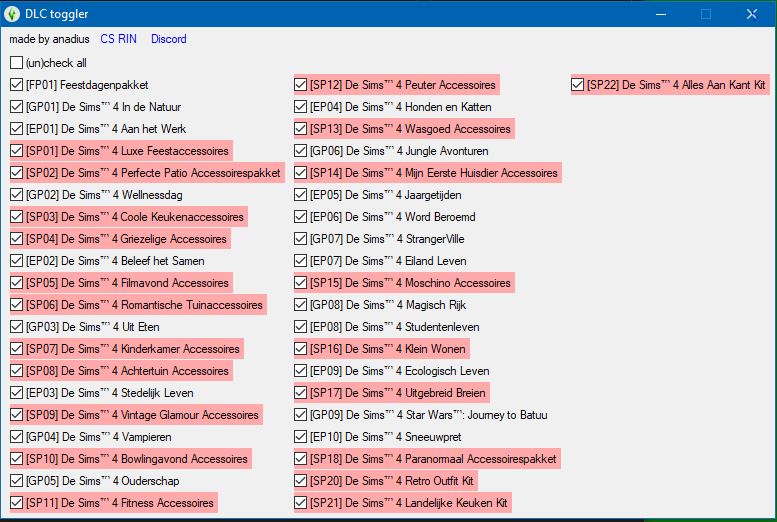 | All non-installed DLC’s are marked in red. In the picture, all SP’s Uncheck the red boxes and close the toggler Make sure all non-red items are ticked When you now start your game it’s clearly visible which items are installed and which are not. |
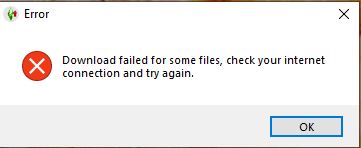 | Should an error occur, just repeat your last selections. All items already downloaded are stored in the folder Update. The program performs a quick check and continues the task. (Make sure that the Updater is under the exceptions of your anti-virus) |
First of all create a new folder The Sims 4 on your computer. Place that folder under the exceptions of your Anti-Virus program Lead the updater in the first step to that folder.
Change language
New users who never played The Sims 4 before on a Windows 10 machine get that error.
Suppose your present version is 1.77.146.1030 and you want to update to the latest version (presently 1.80.69.1030)
Исправление ошибки orangeemu64.dll в The Sims 4
Orangeemu64.dll – динамическая библиотека, которая по умолчанию отсутствует в Windows, но при этом необходима для корректной работы игры The Sims 4. Она устанавливается вместе с играми. Однако некоторые пользователи при попытке запустить те же «Симс» получают сообщение об ошибке, в котором говорится, что данный файл в системе не найден или вовсе, что значит примерно то же самое.

Как устранить ошибку с файлом orangeemu64.dll
Появление ошибки с фалом orangeemu64.dll означает, что он либо не обнаружен игрой (не был установлен или был удален), либо оказался поврежден из-за некорректной установки, действия пользователей или других программ.
Далее постараемся разобраться, каким образом можно восстановить работоспособность игры и устранить ошибку, связанную с данным файлом.
Вариант 1: Переустановка с отключенным антивирусом
Это будет больше актуально для владельцев пиратских копий игры, так как некоторые антивирусы могут мешать их установки, повреждая файлы, входящие в установочный пакет. Некоторые из них попадают в карантин или вовсе удаляются, что может случиться и с рассматриваемым файлом.
Мы советуем изначально удалить игру. Ознакомьтесь с нашей статьей об удалении программ в Windows 7. Даже если вы пользуетесь «восьмеркой» или «десяткой» представленные инструкции будут для вас актуальны.
После удаления игры отключите свой антивирус или добавьте папку с игрой и установочным файлом в исключения антивируса. В качестве примера рассмотрим взаимодействие с Защитником Windows 10 (добавим папку с игрой в исключения):


Только после этих операций можно заново выполнять установку, не опасаясь, что антивирус повредит какие-либо файлы.
Вариант 2: Зарегистрировать библиотеку в системе
Так как файл библиотеки orangeemu64.dll распространяется только в играх от определенного разработчика, то в Windows могут возникнуть проблемы с их регистрацией в системе. В этом случае игра будет показывать ошибку. Проблема решается принудительной регистрацией библиотеки в системе. Для этого нужно обладать правами администратора.
Регистрация новой библиотеки происходит через «Командную строку» — так быстрее и надежнее.


Процедура повторной регистрации библиотеки займет несколько секунд. После нее можете закрыть «Командную строку» и выполнить запуск игры. Перезагрузка компьютера в этом случае совершенно необязательна.
Вариант 3: Обновить Windows
Если проблема появляется при запуске последних игр MAXIS, например, The Sims 4, то проблема может быть в не сделанном обновлении системы. Дело в том, что библиотека orangeemu64.dll в новых играх разработчика активно взаимодействует с элементами системы, а несвоевременное обновление может повлечь за собой проблемы во взаимодействии.
Мы рекомендуем установить актуальные обновления для системы, чтобы библиотеки работали корректно. Сделать это можно таким образом:


Когда актуальные обновления будут установлены компьютер перезагрузится. Попробуйте запустить игру.
Вариант 4: Обновить драйвера видеокарты
Неактуальные или несовместимые драйвера видеокарты тоже могут повлиять на корректность работы файла orangeemu64.dll. Если вдруг обнаружится конфликт двух составляющих, на экране появится ошибка, а игра непредвиденно завершит свою работу. Мы рекомендуем проверить драйвера вашей видеокарты на актуальность и установить необходимые обновления, если это потребуется.
У нас есть статьи про обновления драйверов видеокарт от двух основных фирм – AMD и NVIDIA.
Вариант 5: Обновление DirectX
Здесь ситуация примерно такая же как с Windows и драйверами видеокарты. Для корректной работы игр мы рекомендуем скачать и установить актуальную версию DirectX с официального сайта Microsoft:

Когда закончите можете переходить сразу же к попыткам запустить игру, с которой у вас были проблемы. Если они действительно были связаны с несовместимостью библиотек, то проблема после проделанной инструкции будет успешно исправлена.
Вариант 6: Запустить проверку и исправление целостности системных файлов
Если системные файлы были повреждены, то это тоже может привести к проблемам с библиотекой orangeemu64.dll, так как она взаимосвязана с данными файлами. Если повреждения системных файлов несущественны, то их можно восстановить с помощью нескольких команд в «Командной строке», однако выполнение процесса восстановления займет некоторое время.
Мы уже рассматривали, как восстановить системные файлы в Windows 10. Представленная по ссылке инструкция будет актуальна и для других версий операционной системы.
Вариант 7: Снятие изоляции с ядра
Системное ядро в «десятке» более изолировано, чем в других версиях Windows. Это позволяет избежать или минимизировать ущерб вирусных атак, однако в редких случаях изолированное ядро может мешать работе некоторых сторонних DLL-библиотек.
В качестве крайней меры, если предыдущие варианты решения проблемы не помогли, мы предлагаем отключить изоляцию ядра. Сделать это можно так:


Отключив целостность ядра вам потребуется выполнить перезагрузку компьютера, чтобы изменения наверняка применились. Попробуйте запустить игру, с которой у вас были проблемы.
Мы разобрали популярные причины, по которым пользователи встречаются с ошибкой orangeemu64.dll, а также решения к ним. Вам придется отыскать методом подбора подходящее для вас решение.
The Sims free downloads for windows
The Sims 4 selective download (Anadius repack)
A perfect method to install and add DLC’s with the minimum amount of download-space
Version 1.81.72.1030 incl. Blooming Rooms
suitable for 64-bits Windows only
Step 1 interactive-instructions
Pack System Users
Step 2
Right-click on the picture below and select Open in a new tab for an enlargement

Step 3 (example)
Step 3a
You can use this method for a full all-in-one installation.
As you can see, I ticked Base Game in the left-hand column and all items after Paranormal in the right-hand column
Step 4
Based on what I ticked in step 3
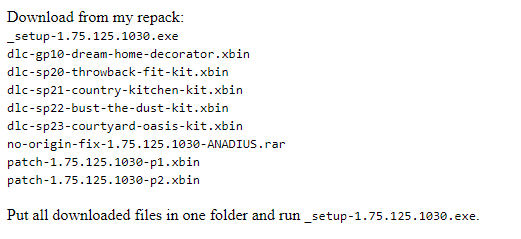
You now see which files you have to download and store these downloads in 1 folder.
Files you always must tick whatever you try to update or add
Setup xxxxx.exe
Patch-xxxxx-p1.xbin
Patch-xxxxx-p2.xbin
no-origin-fix-xxxxx.rar
whereby the xxxxx represents the version-number.
+ of course the extra packs you want to install as well.
Step 5 – via torrents
download the torrent and only tick those items as described in step 4.
(your choice could be quite different of course)
When downloads are completed:
Run Setup-xxxxx-.exe and play the game when finished
Torrents with multiple choice
You can use such torrents only once.
In case you want to open the multiple choice again you must
362 thoughts on “ The Sims 4 Anadius selective download ”
the screen resolution resets from 1920×1030 to 1920×1001. I change it every time, I save the changes, but it returns as before. I have removed the mods folder, but the problem remains. I need the maximum screen resolution.
It looks like you play in windowed modus. Your resolution of 1920×1030 (full screen) will be reduced with the number of pixels required for showing the taskbar.
(In your case 1920×29)
Hi, every time I try click on a new world it says ‘origin in game has been disabled in the origin client…’ and I’ve tried enabling it in the origin app and in the sims 4 app, I enabled the in game surveys but I still can’t go on to the new worlds. What do I do? Please help ;(
95% of all problems are caused by outdated mods/cc/scripts
Move (not copy) the folder The Sims 4 out of C:\Documents\Electronic Arts temporarily to your desktop, then try your game again.
Later on you can copy the folders Tray amd Saves back from your desktop to the newly created folder The Sims 4 in C:\Documents\Electronic Arts.
Did that, but now I’m getting the:
Please download The Sims 4 Legacy Edition from Origin. [5de4b8a3:29f00e76:00000000:00000000] error message.
Game version: [b]1.81.72.1030[/b]
Crack version: [b]1.81.72.1030[/b]
Folder: [b]The Sims 4[/b]
Crack used: [b]ANADIUS[/b]
Legacy Edition: [b]not installed[/b]
[color=#026526][b][u]Hash mismatch:[/u][/b][/color]
— quick scan —
[color=#026526][b][u]Missing files:[/u][/b][/color]
please help me, I’m getting an error unable to start: initialization error at start up. [135dec40:29f00e76:00000084:18a1dd51
Initialization error at start up. [135dec40:29f00e76:00000084:18a1dd51]
95% of all errors are mod-related
Temporarily move the folder mods from Documents\Electronic Arts\The Sims 4\Mods to your desktop, then try your The Sims 4 again.
My game version is 1.55 something, will the selective download automatically add all missing patches in between? Thanks.
No, but the Anadius Updater will do it for you
hey so when I’m in CAS the entire screen is black, so I tried just starting the game without customizing the sim, thinking it might fix the issue, but the screen was still black when I moved my sim into a neighbourhood. pls help?
Mods/scripts/cc cause 95% of all problems.
Hello can i ask you something?
In my case, if i click the game it’s doesn’t work, they said ” the code execution cannot proceed bcz VCRUNTIME140.dll was not found. Reinstalling the program may fix this problem ” so what can i do after this? I don’t know what to do. I already download all pack and repair and update too but it’s doesn’t work. I can’t play the game 🙁 pls help me..
Run vcredist from THIS PAGE under the heading Missing MSVCP120.dll file
Hello, ever since i updated and installed new packs there has seemed to be an error with my game. It says I installed all packs but it won’t let me use the packs, especially those I downloaded long time ago. I tried updating and repairing but it doesnt work. when i try to click on the uninstalled world it says “Origin in game has been disabled in the origin client”. How can I fix this. Thank you
Hi there! I’m still trying to update game but it doesn’t let me.It’s still the same message permission error.What should I do?I didn’t delete anything except data and delta in the game installation folder,just like you said it.
1. In your anti-virus program add your installation folder of the Sims 4 to the exceptions.
2.Open the updater. Right-click on Sims-4-updater and select Run as Administrator
3. When updater starts, browse to your installation folder (don’t open it)
4. Click on Repair, don’t tick anything else.
5. When successfully finished, play your game from your installation folder – Game – Bin – TS4_x64.exe (or when you have 32-bits Windows from Installation folder – Game – Bin_LE – TS4.exe)
Any error during update please copy the full error and paste it in your reply.
Please reply on the page of the Updater and no longer in this page.
This game can be played online as though it is the original copy? Bcs I’ve downloaded it and there is an “always online” icon on the desktop.
Yes but you have to apply a valid remid code – see THIS PAGE
When you do have at least a legal copy of the Sims 4 you better use THIS METHOD
hi! ive downloaded ur recent update but when i open the game, it hangs and cannot show the task option with thumbnails of the sim (e.g. when cooking, it cannot show the food options; cant play when my sims are in different lots). im downloading it again and i hope itll work this time
I was having trouble with connection internet in my house and updater tool didn’t want to continue because of that,which is reasonable,but when I open updater tool and I click on repair option,I get it again message saying “Make sure to add update to your exception list on your anti-virus.If that doesn’t help disable your anti-virus completely.If you stil get this error,copy the whole game folder to somewhere else.And if that doesn’t help,then copy the whole game somewhere else.”
So,I disable antivirus for 4 hours,then completely until computer it’s restarted to make sure it’s not because of that.Then I enable antivirus and I added this updater folder in exception list,but still didn’t want do finished the update.It’s still the same message.I copy updater folder somewhere else,like on desktop but still same.I extract file sims 4 updater and when I want to update,still the same message.It came till clientdeltabuild 0 package and that error it shows up.I really I am out of options here.I have enough space to do update,but I still don’t know what to do.And also I need to mention that I left my computer for couple days until updater finish
Can I delete rar the sims 4 all in one 1.80 version file?Before the update finished?It’s gigantic size around 49.95 gb.
So can i safetly deleted utorrent app and still play game?This update takes a lot space and I need it space.I also download fashion kits,latest dlc,but I don’t know should I do copy these files after update.Also on which folder should I play game?The original folder sims 4 or update folder
That fully depends on the folder you updated with the Anadius Updater.
When you updated your original folder (legal one) you must of course use that folder to play (it should be version 1.80.69.1030 with all DLC’s)
When you updated your cracked folder play with that cracked folder. (version 1.80.69.1030 also with all DLC’s)
In both cases you can then safely delete all downloaded torrents.
And I still can play game?Like I don’t need utorrent to play game?Also what to I do with fashion kits latest update?
You don’t need a torrent to play (exception: The Sims 4 all-in-one)
Once you have successfully copied the files from the torrent to your installation folder you can destroy the torrent and the related download.
I disabled antivirus for 1 hour and it does let me to do the repair,but not update.I guess I will leave computer for a while until it’s finished to repair game.After repairing game what should I do next?
In the end the repair option includes also the update. So after the repair is finished everything should be OK.
Okay,but the only question that I have right now it is what should I do next after repairing game?
When repair is completed, play the game.
When I want to repair game it says “Permission error.Make sure to add updater folder in your exception list in your anti-virus.If that doesn’t help disable your antivirus completely.If you still get this message error copy the whole sims 4 folder somewhere else..And if that still doesn’t help then copy your whole game somewhere else.”
This update just make things worse 🙁
It did the update but now it says “base game not found in the selected folder.Select a correct path or use Repair if you want to install game(not reccomended,download game somewhere else”!I don’t know what to do next.And now when I want to open game in the original game folder it says unable to start:Initializion error at start up. (135dec40:69731fb6:00000068:00000000)
please respond it really quickly.
So only repair game?This is all I have I’ve deleted delta and data folder like you said.